
Wallpaper Engine
Related Games





Description
🔥 What is Wallpaper Engine for PC
Wallpaper Engine for PC is an innovative customization application developed by Kristjan Skutta and published by Wallpaper Engine Team, designed to transform the static desktop background into an interactive and living environment. It allows users to animate their Windows desktop with dynamic wallpapers that can react to music, system performance, or even mouse movements, providing a sense of personalization far beyond what traditional wallpapers offer. By combining the simplicity of a wallpaper app with the creativity of a design platform, Wallpaper Engine encourages users to create, share, and modify an ever-growing library of animated backgrounds through the Steam Workshop.
This application is not just a passive display tool but a creative playground where imagination meets technical craftsmanship. Whether you prefer serene natural landscapes subtly moving in the background, neon sci-fi cityscapes glowing to the rhythm of your favorite song, or interactive 3D scenes that react to your cursor, Wallpaper Engine makes it possible. The software supports a wide range of media types, including videos, 2D and 3D animations, and even real-time graphics created with engines like Unity or Unreal. It is both an art tool and a productivity enhancer, adding vibrancy to your PC environment without compromising performance.
👉 Features of Wallpaper Engine
Wallpaper Engine offers an impressive set of features that make it one of the most flexible and engaging desktop customization tools available. Below are the most notable highlights that define the experience.
Vast Collection of Animated Wallpapers
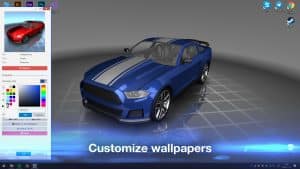
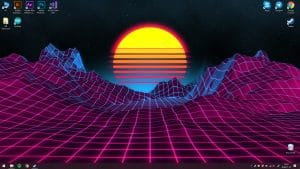
Wallpaper Engine grants access to a massive community-driven library hosted on Steam Workshop, where users can browse and download thousands of animated wallpapers. These range from simple parallax backgrounds to complex 3D environments that simulate lighting, weather, or depth of field effects. The diversity is staggering, ensuring that no matter your aesthetic preferences, there is something that fits your mood and personality.
Interactive and Audio Responsive Designs
A particularly charming feature of Wallpaper Engine is the ability to make wallpapers respond dynamically to sound or user input. For example, visualizers pulse to the beat of your music, rain falls harder with system activity, and glowing effects shimmer when you move the mouse. This interactivity gives your desktop a living quality that reacts to your behavior, turning even idle screen time into something visually engaging.
Powerful Editor and Customization Tools
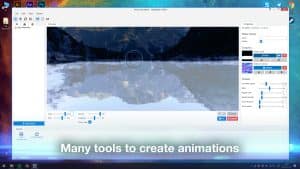
The built-in wallpaper editor allows users to craft their own animated designs using a surprisingly intuitive interface. It supports importing video files, 3D models, and scripts to create motion effects or dynamic elements.
Even beginners can easily modify existing wallpapers, while advanced users can implement particle systems, lighting layers, and custom logic for interactive scenes. The editor’s visual scripting makes creativity accessible without requiring deep programming knowledge.
Multi-Monitor and Performance Optimization
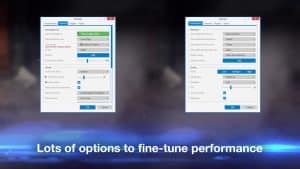
One of Wallpaper Engine’s strengths lies in its careful handling of performance and multi-display setups. Users can apply different wallpapers to each screen, adjust playback speed, and define frame rate limits. The application intelligently pauses animations when games or full-screen apps run, ensuring it never consumes unnecessary system resources. This level of optimization means even high-end animated wallpapers can run smoothly on modest hardware.
Regular Updates and Community Support
Wallpaper Engine’s developers continuously improve the software with new features, bug fixes, and compatibility updates. The active community also plays a key role, contributing tutorials, custom assets, and technical help through the Steam forums. This collaborative ecosystem ensures the platform evolves organically and remains a hub for creativity long after installation.
Gameplay
Creativity as Interaction
Although Wallpaper Engine is not a game in the traditional sense, its interactive nature makes it feel like a sandbox experience for digital art. The process of designing wallpapers, adjusting effects, and experimenting with user input can be as engaging as playing a creative simulation game. Each wallpaper behaves like a micro-interactive scene that encourages exploration and discovery.
Workshop Integration
The seamless integration with Steam Workshop functions almost like a multiplayer hub for artists and enthusiasts. Users can publish their own creations or download those of others with a single click, constantly refreshing their desktop experience. The browsing process, complete with previews, tags, and user ratings, turns customization into an addictive cycle of discovery and sharing. It mirrors the excitement of exploring a virtual gallery that updates daily with new exhibits.
Performance Control and Usability
Wallpaper Engine includes a smart performance system that detects when the user is running games, watching videos, or using battery power, automatically suspending wallpapers to save resources. This feature ensures that the app remains lightweight, never interfering with work or play. It also supports hardware acceleration, which allows for crisp, smooth visuals without lag or stuttering even on multi-monitor setups.
Graphics
Visual Diversity and Artistic Freedom
Wallpaper Engine stands out for its extraordinary visual diversity and adaptability. It supports wallpapers ranging from subtle looping scenes to cinematic 3D animations with real-time lighting and particle effects.
This means the software is not tied to a single aesthetic it can be minimalist, futuristic, artistic, or nostalgic depending on the creator’s imagination. Many wallpapers use visual storytelling techniques similar to short films, conveying emotion through motion, lighting, and sound.
Technical Rendering and Quality
Technically, Wallpaper Engine utilizes modern rendering pipelines and hardware acceleration to deliver consistent visual quality across devices. The support for resolutions up to 8K ensures that even the most detailed wallpapers look sharp on large or curved monitors.
Special effects such as bloom, parallax mapping, and volumetric fog can be layered into scenes, giving them a professional and immersive appearance. The application’s balance between artistic flexibility and technical precision is one of its defining achievements.
Pros and Cons
✔️ Pros
- Unmatched customization: Gives users full creative freedom to personalize their desktop environment with dynamic, interactive wallpapers.
- Active community and constant updates: The Steam Workshop integration ensures a steady flow of new content and inspiration.
- Efficient performance management: Smart pausing and GPU optimization prevent unnecessary power or CPU usage.
- Easy to use yet deep tools: The built-in editor allows both casual users and professionals to create high-quality wallpapers without steep learning curves.
❌ Cons
- Windows only: Despite demand, Wallpaper Engine does not have native support for macOS or Linux.
- Potential distraction: Some highly dynamic wallpapers may interfere with productivity or focus if used during work.
- Resource heavy for older hardware: While optimized, complex 3D wallpapers can still strain low-end systems.
ℹ️ Game information
Release Date: 16/11/2018
Update Date: 30/12/2025
Version: v2.4.113
Genre: Action / Simulation
Platform: PC
Language: 


Weight: 512 MB
Additional info: New version includes all DLCs to date
⭐ Installation Instructions
- The game is fully complete, you just need to install it, so there is no need to unpack it or download it from other sources.
- Just run the Wallpaper Engine.exe installation file.
- Simply launch the game from shortcut desktop.
⚙️ System Requirements
✅ Minimum:
- OS: Windows 10/11 64-bit
- Processor: 1.66 GHz Intel i5
- Memory: 1 GB RAM
- Graphics: HD Graphics 4000
- DirectX: Version 11
- Network: Broadband Internet connection
- Storage: 512 MB available space
✅ Recommended:
- OS: Windows 10/11 64-bit
- Processor: 2.0 GHz Intel i7
- Memory: 2 GB RAM
- Graphics: NVIDIA GeForce GTX 660 / AMD HD7870, 2 GB VRAM
- DirectX: Version 11
- Network: Broadband Internet connection
- Storage: 512 MB available space
Images
Video
Best Rated Games
 Virtua Cop 21.88.0 SEGA
- UpdatedThe Sims 41.122.218.1030 Maxis
- Grand Theft Auto V1.0.3751.0/1.72 Rockstar North
- Hogwarts LegacyBuild 1420267 Avalanche Software
- Persona 3 Reload1.09 ATLUS
- Warcraft III: Reign of Chaos1.0 Blizzard Entertainment
- People PlaygroundBuild 21984831 mestiez
- Grand Theft Auto: Vice City1.112 Rockstar Games


