
Kid Pix Deluxe 4
Related Games





Description
🔥 What is Kid Pix Deluxe 4 for PC
Kid Pix Deluxe 4 for PC is a delightfully imaginative drawing and animation program designed primarily for children, yet it possesses enough creative tools to capture the interest of adults who appreciate digital art in its purest and most unfiltered form. Developed by The Software MacKiev Company, this edition continues the tradition of the original Kid Pix series by offering a safe and engaging space where young users can experiment with drawing, painting, stamping, and storytelling. Unlike standard paint software, Kid Pix Deluxe 4 transforms simple sketching into a sensory rich experience through its sound effects, animated tools, and playful interactivity that encourages creative exploration rather than technical precision.
At its core, the game embraces the philosophy that art for children should be spontaneous, accessible, and, above all, fun. It lets kids draw wild creatures with digital crayons, fill the screen with colorful explosions of paint, or build complex stories through slideshows and stop-motion animations. The interface, filled with friendly icons and cheerful sound cues, helps even the youngest users navigate effortlessly without adult supervision. It is more than a digital coloring book; it is a gateway to creativity that feels like a toy box filled with endless surprises.
👉 Features of Kid Pix Deluxe 4
Intuitive, Child-Friendly Interface
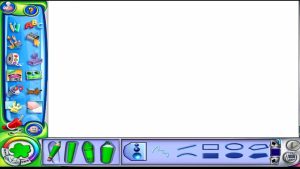
Kid Pix Deluxe 4 was built with simplicity at its heart, using large buttons, vivid colors, and fun sound effects that guide the user naturally through the creative process. Every tool has an instantly recognizable icon, making it accessible to children who are just beginning to read. It’s an interface that feels alive, reacting with cheerful noises or animations every time the user interacts with it.
Huge Variety of Tools and Effects
The game offers an impressive assortment of drawing tools, stamps, backgrounds, and animations that can be combined freely. Children can experiment with brushes that splatter, swirl, or sparkle, and add stickers or pre-drawn characters that can be resized, flipped, or animated. There are special effects such as fireworks, spinning objects, or dripping paint that keep each drawing session unpredictable and exciting.
Multimedia Storytelling and Slideshow Creation
One of the defining features of Kid Pix Deluxe 4 is its built in movie and slideshow creation tool. Kids can take their individual drawings and turn them into animated stories by adding sound effects, voice narration, and music. The result feels like a personal cartoon that can be shared with friends or family, giving children a sense of accomplishment and authorship.
Sound and Voice Integration
With a simple microphone setup, users can record their own voices to narrate their stories, sing songs, or make their characters talk. This feature adds another sensory dimension to the creative process and helps children engage with technology in a way that feels expressive rather than technical.
Easy Sharing and Printing Options
The program also includes options for printing artwork or exporting slideshows to share digitally. Parents can easily save their child’s artwork as image files, making it possible to create personal galleries or even print coloring books made entirely by the young artist.
Gameplay
Creative Freedom as Gameplay
Kid Pix Deluxe 4 doesn’t have levels, goals, or achievements in the traditional gaming sense; instead, the gameplay revolves entirely around self-expression and experimentation. The fun lies in discovering what each tool does and combining them in unexpected ways. For example, a child might draw a house with the crayon tool, then fill the sky with stickers of stars that sparkle and spin, and finally record their voice to describe what’s happening in the scene. The sense of reward comes from creation itself, rather than competition or scoring.
Animation Studio and Interactive Slideshows
The animation mode, which allows users to create simple frame-by-frame sequences, introduces children to the fundamentals of motion and storytelling. Each slide becomes a piece of a larger narrative, and the process of putting them together resembles building a digital picture book. The inclusion of sound effects and voice recording makes it more than a drawing tool it becomes an early introduction to multimedia design. Kids quickly learn that art can move, speak, and tell stories, turning passive doodling into active creation.
Tools That Teach Through Play
Many of the tools in Kid Pix Deluxe 4 subtly teach artistic and technical principles through play. The paint bucket introduces the idea of color fills, the stamp tool reinforces pattern repetition, and the eraser tool demonstrates correction and revision. Without realizing it, children practice digital literacy mouse control, drag-and-drop, layering while remaining immersed in a playful, non-judgmental environment. This seamless fusion of learning and fun is one of the program’s strongest qualities.
Graphics
A Bright and Playful Visual Identity
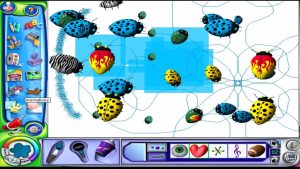
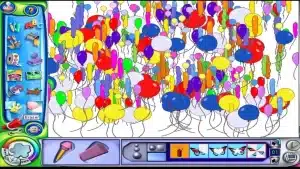
Kid Pix Deluxe 4 adopts a visual language that feels like a carnival of color, movement, and charm. Its interface is bursting with cartoonish buttons, animated characters, and hand drawn icons that invite curiosity rather than intimidation. Every brushstroke appears vividly on the canvas, and the bright color palette ensures that nothing ever feels dull or sterile. The aesthetic approach is designed not for realism but for engagement, where every visual element feels as if it’s encouraging the player to try something new.
Animation, Motion, and Visual Feedback
The game’s animations are fluid and humorous, which keeps kids entertained and emotionally connected to their creations. For instance, the undo button doesn’t simply erase a mistake; it triggers a little performance sometimes a character sweeping the error away or an explosion of color. This kind of visual feedback ensures that the experience remains joyful rather than frustrating, even when things go wrong. It’s a smart design choice that reflects deep understanding of child psychology and motivation.
Technical Simplicity with Creative Depth
Though the graphical engine is not advanced by modern standards, its simplicity is intentional and well-suited to the target audience. It runs smoothly on modest PCs, maintaining high responsiveness even when multiple effects are active. The lightweight design allows the focus to remain on creativity rather than performance. This clarity and playfulness make Kid Pix Deluxe 4 timeless it never feels outdated because it is built around emotion and imagination rather than technology.
Pros and Cons
✔️ Pros
- Exceptionally intuitive interface that allows children to create without frustration or confusion.
- Wide variety of tools and effects that make every creative session unique and memorable.
- Educational value through subtle lessons in design, storytelling, and digital literacy.
- Playful sound and animation feedback that keeps children emotionally engaged.
- Great performance even on older computers, making it accessible for family use.
❌ Cons
- Limited appeal for older children or teens who may seek more advanced features.
- Some effects and sound cues may feel repetitive after long play sessions.
- The interface, while charming, can feel slightly dated compared to modern design standards.
ℹ️ Game information
Release Date: 16/12/2004
Update Date: 17/12/2025
Version: v6.5.1
Genre: Adventure
Platform: PC
Language: 


Weight: 1 GB
Additional info: New version includes all DLCs to date
⭐ Installation Instructions
- The game is fully complete, you just need to install it, so there is no need to unpack it or download it from other sources.
- Just run the Kid Pix Deluxe 4.exe installation file.
- Simply launch the game from shortcut desktop.
⚙️ System Requirements
✅ Minimum:
- OS: Windows 10/11 64bit
- Processor: Intel Core i3
- Memory: 2 GB RAM
- Graphics: DirectX 9.0c compatible 512MB+
- DirectX: Version 9.0c
- Network: Broadband Internet connection
- Storage: 1 GB available space
Images
Video
Best Rated Games
 Virtua Cop 21.88.0 SEGA
- UpdatedThe Sims 41.122.218.1030 Maxis
- Grand Theft Auto V1.0.3751.0/1.72 Rockstar North
- Hogwarts LegacyBuild 1420267 Avalanche Software
- EA Sports UFC 51.29 Electronic Arts
- Need for Speed: Payback1.0.51 Ghost Games
- Elden Ring: Shadow of the Erdtree1.16 FromSoftware
- Need for Speed: Underground 21.2 Electronic Arts


